

If you’re new to Kubernetes, you’ll quickly come across the term Pod. Think of a Pod as the smallest building block in the Kubernetes world. Just like Lego pieces snap together to create bigger structures, Pods are the foundation upon which Kubernetes applications are built.
Table of Contents
What is a Pod in Kubernetes?
A Pod is the smallest deployable unit in Kubernetes. It can hold one or more containers that run together on the same node. These containers inside a Pod share:
- Storage volumes (making it easy to share files)
- Networking (they can talk to each other via
localhost) - Operating system resources like IPC (Inter-Process Communication)
So, instead of running containers in isolation, Kubernetes groups them into Pods for better management and collaboration.
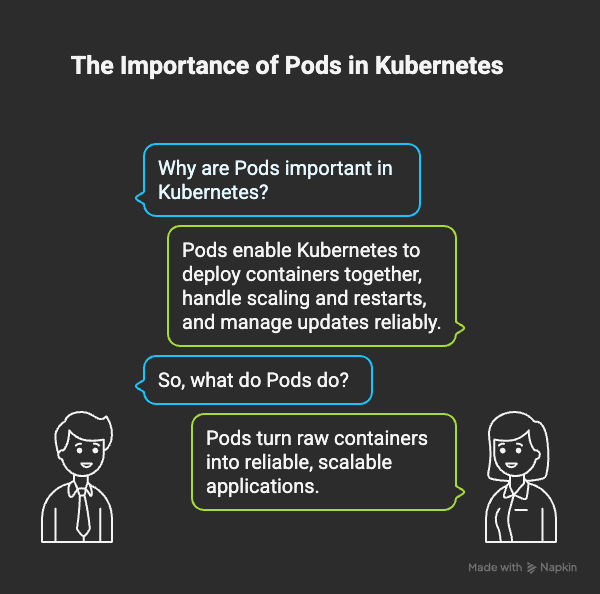
Why Pods are Important in Kubernetes
Without Pods, Kubernetes wouldn’t know how to:
- Deploy containers together in a meaningful way.
- Handle scaling, restarts, or replacements when something breaks.
- Manage updates in a controlled, resilient fashion.
In short, Pods help Kubernetes turn raw containers into reliable, scalable applications.
Pod Architecture and Core Concepts
Containers Inside a Pod
A Pod can run:
- A single container – the most common scenario.
- Multiple containers – working closely together, often in a helper-main setup.
For example, a web server might be the main container, while a logging container runs beside it.
Shared Resources: Networking, IPC, and Volumes
Inside a Pod, containers share:
- Network namespace → they see the same IP address.
- Volumes → they can read/write to the same storage.
- Sometimes PID namespaces → if enabled, containers can see each other’s processes.
This makes Pods tightly integrated environments.
Ephemeral Nature of Pods
Pods are not permanent. If a Pod fails, Kubernetes doesn’t try to “fix” it. Instead, controllers like Deployments or ReplicaSets spin up a brand-new Pod to replace it.
Pod Lifecycle in Kubernetes
Phases of a Pod
Pods move through several phases:
- Pending – accepted by the system, but waiting for resources or images.
- Running – bound to a node, containers are starting or already running.
- Succeeded – containers finished successfully and won’t restart.
- Failed – at least one container crashed or couldn’t start.
- Unknown – system can’t determine the Pod’s state.
Readiness, Liveness, and Startup Probes
- Readiness probe: Is the Pod ready to serve traffic?
- Liveness probe: Is the Pod still alive, or should it be restarted?
- Startup probe: Gives slow-starting containers extra time before failing.
These health checks help Kubernetes decide when and how to restart Pods.
Container Restarts and Policies
Depending on restart policy:
- Pods can be restarted automatically.
- Or, Kubernetes may leave them stopped if designed that way.
Advanced Pod Patterns
Sidecar Containers
A sidecar is a helper container inside the same Pod as the main app. Examples include:
- Log collectors
- Monitoring agents
- Proxies
They run alongside the main container and extend its functionality without touching its code.
Ephemeral Containers
Ephemeral containers are temporary helpers. They’re used for debugging and can be added to a running Pod. Unlike sidecars, they:
- Don’t restart automatically.
- Can’t define probes or open ports.
They’re ideal for troubleshooting without disrupting production workloads.
Handling Pod Disruptions
Voluntary vs Involuntary Disruptions
- Involuntary disruptions → hardware crashes, node failures, or network outages.
- Voluntary disruptions → admin actions like upgrading nodes, draining them, or deleting controllers.
Pod Disruption Budgets (PDB)
A PDB lets you control how many Pods can be down at once. For example:
- You might say, “At least 2 Pods must stay running during upgrades.”
This ensures apps remain available even when changes are happening.
Pod Networking and DNS Behavior
Hostname Defaults
By default, a Pod’s hostname is its metadata.name.
Custom Hostnames and Subdomains
You can override hostname and define subdomains. This makes Pod names predictable:<hostname>.<subdomain>.<namespace>.svc.cluster.local
Pod Quality of Service (QoS) Classes
Kubernetes assigns QoS classes based on CPU and memory requests/limits:
- Guaranteed → All containers have equal requests and limits. Highest priority.
- Burstable → Some containers specify limits, others don’t. Medium priority.
- BestEffort → No resource limits at all. Lowest priority; first to be evicted.
This helps Kubernetes decide which Pods to evict under pressure.
Security and User Namespaces
How User Namespaces Improve Isolation
User namespaces map container users to different IDs on the host. This:
- Improves security by limiting access.
- Helps run untrusted workloads safely.
Summary: How Pods Fit in Kubernetes
To wrap it up:
- Pods are the atomic unit of Kubernetes.
- They group containers, share resources, and ensure apps run smoothly.
- Features like sidecars, ephemeral containers, QoS, and PDBs give you flexibility and resilience.
Understanding Pods is the first step toward mastering Kubernetes.
FAQs About Pods in Kubernetes
Yes, a Pod can run multiple containers if they need to work closely together.
Pods are ephemeral. Kubernetes replaces them automatically through controllers like Deployments or ReplicaSets.
A Pod is a wrapper around one or more containers, providing shared resources and management.
Sidecars extend the functionality of main containers, often handling logging, monitoring, or networking tasks.
No. Ephemeral containers are temporary and used for debugging, while sidecars run alongside the main app to enhance functionality.
QoS determines eviction priority. BestEffort Pods are removed first when resources are scarce, while Guaranteed Pods stay the longest.
[Video] Pods in Kubernetes Explained
Conclusion
Pods are the core unit of deployment in Kubernetes, managing containers, sharing resources, and ensuring workloads stay resilient. By understanding Pod lifecycle, sidecars, ephemeral containers, QoS, and disruption handling, you gain the foundation to build scalable, reliable cloud-native applications.
[…] logical partition within a Kubernetes cluster that helps group and manage resources like Pods, Services, and Deployments under a common […]