When converging a Platform Services Controller (PSC) to an embedded one, administrators often face a frustrating error:
“The vCenter Server appliance build number does not match with the vCenter Server appliance configured in the update repository.”
This error typically appears during the convergence process and prevents administrators from completing the migration. Luckily, the issue can be resolved with the right prerequisites and troubleshooting steps.
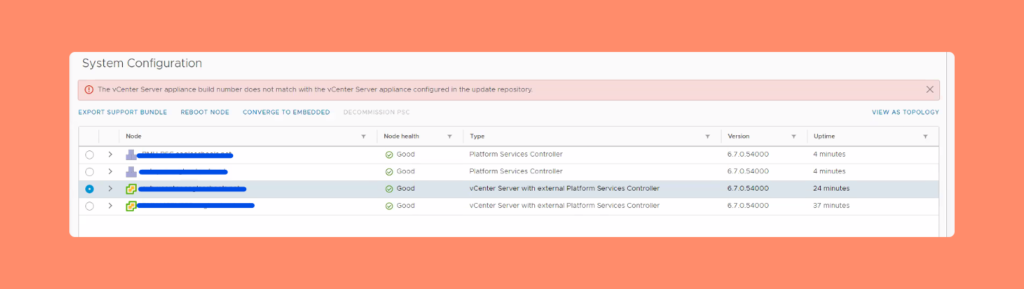
Table of Contents
PSC Convergence Prerequisites
Before starting the convergence process, make sure the following conditions are met:
- ⏱ Check NTP server configurations – Ensure time synchronization across servers.
- 🌐 Verify DNS records – Confirm A and PTR records are correctly set up.
- 💾 Back up PSCs and vCenters – Always back up all appliances in the SSO domain.
- 📀 Download the correct ISO – If your vCenter lacks internet access, download the exact same ISO version you are running.
- 🔒 Disable vCenter HA – High Availability should be turned off before convergence.
Following these prerequisites will minimize errors during the convergence process.
How to resolve the issue
- Verify Update Repository URLs
- Log in to the VAMI page of both the PSC and vCenter.
- Go to Update > Settings.
- Ensure both URLs are set to default.
- Restart the Convergence Process
- After confirming the URLs, retry the convergence. If the error persists, continue with the next step.
- Check URLs via SSH
- Log in to both PSC and vCenter appliances using SSH.
- In the appliance shell, run the command:
- This will display the current and default URLs.
update.get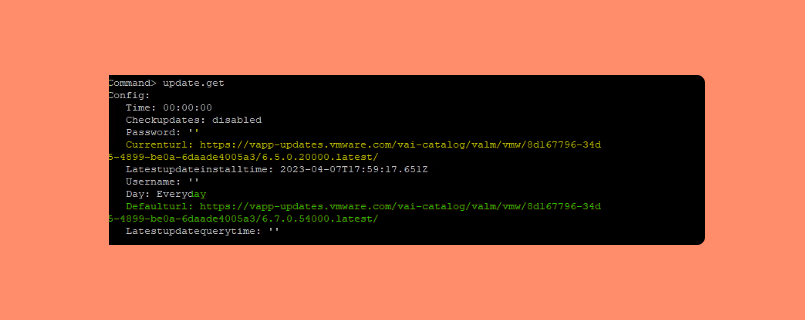
- Reset the Repository URL if Needed
- If you notice mismatched URLs, reset them with:
update.set --currentURL "default"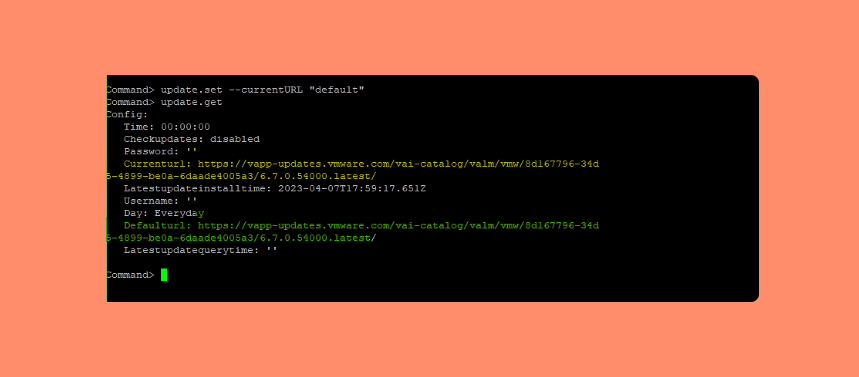
- Switch to Appliance Shell (If Needed)
- Sometimes, logging in via SSH defaults you to the bash shell instead of the appliance shell. To fix this, run:
chsh -s /bin/appliancesh rootOnce corrected, proceed with the convergence process again.
Frequently Asked Questions (FAQs)
The error is usually caused by a repository mismatch between the PSC and vCenter appliances.
Log in to the VAMI page > Update > Settings and confirm that the URL is set to default.
Yes, vCenter HA must be disabled before starting the PSC convergence process.
Run the command chsh -s /bin/appliancesh root to switch to the correct shell.
Yes. Simply download the exact same vCenter ISO version manually and use it for the convergence.
Conclusion
The vCenter PSC convergence error is common but easy to fix if you follow the right prerequisites and troubleshooting steps. By verifying update repository URLs, checking NTP/DNS settings, and resetting mismatched configurations, you can resolve the issue smoothly.