Managing large volumes of data can be challenging, especially when balancing performance and cost. While an all-flash storage solution is fast, it can also be very expensive—and not every application needs that level of speed.
That’s where FAST VP comes in. It’s an advanced, automated solution that moves your data between different types of drives based on usage, ensuring you get the right mix of speed and efficiency.
Table of Contents
What is FAST VP?
FAST VP stands for Fully Automated Storage Tiering for Virtual Pools. It’s a smart system used in storage arrays that automatically places data on the most appropriate type of storage.
In a typical storage array, you might have:
- SSD or flash drives for speed
- SAS drives for balanced performance
- SATA drives for high capacity
Instead of manually deciding where to put your data, FAST VP categorizes it and moves it to the best tier based on how often it’s used.
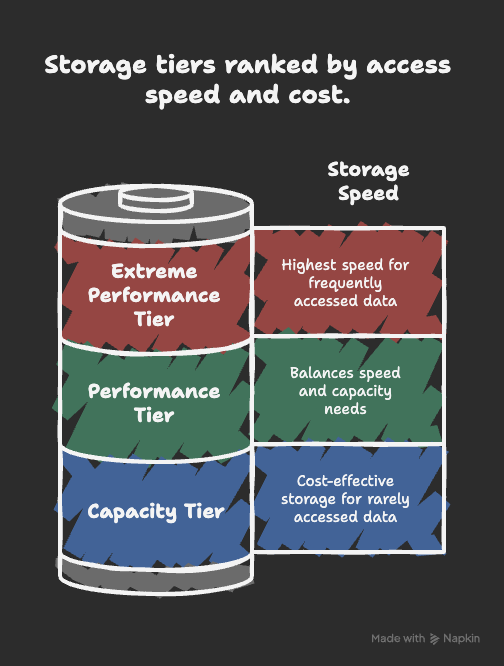
Storage Tiers in FAST VP
1. Extreme Performance Tier
- Built on SSD/Flash drives
- Stores hot data (frequently accessed data)
- Provides highest speed and responsiveness
- Data automatically moves here if it’s heavily used
2. Performance Tier
- Uses 10K and 15K SAS drives
- Stores data that isn’t accessed all the time but still needs reasonable performance
- Balances speed and capacity
3. Capacity Tier
- Uses SATA or Nearline SAS (7.2K) drives
- Stores cold data (rarely accessed)
- Optimized for cost-effective storage rather than speed
Data Relocation in FAST VP
Data doesn’t stay fixed in one place. FAST VP automatically relocates data between tiers based on policies.
The states of relocation include:
- Ready → Data is prepared to be moved
- Relocating → Data is being transferred
- Paused → Relocation process is temporarily stopped
This ensures data always lives in the right tier for its usage pattern.
Types of Data
Hot Data
- Data that’s accessed frequently
- Usually lives in the Extreme Performance Tier or Performance Tier
Cold Data
- Data that’s rarely used
- Stored in the Capacity Tier for cost savings
FAQs about FAST VP in Storage
FAST VP means Fully Automated Storage Tiering for Virtual Pools.
It balances cost and performance by automatically moving data between SSDs, SAS, and SATA drives.
No, FAST VP is automated. It monitors data usage and relocates it automatically.
It’s the process of moving data between tiers (SSD, SAS, SATA) depending on how often it’s used.
Hot data is frequently accessed and kept in faster drives, while cold data is rarely used and stored in cheaper, slower drives.
Conclusion
FAST VP is a smart storage solution that helps IT teams get the best of both worlds—performance where it’s needed and cost savings where it matters most.
By automatically moving hot data to SSDs and cold data to cheaper SATA drives, FAST VP ensures that businesses don’t overspend on storage while still maintaining excellent performance.
In short: FAST VP keeps your storage efficient, balanced, and cost-effective.