

A Deployment in Kubernetes is one of the most essential controllers for managing stateless application workloads. It works as a higher-level abstraction that handles Pods and ReplicaSets, making it easier to define, update, and scale applications with minimal downtime.
In simple terms, when you create a Deployment, you declare the desired state for your application — such as which container image to use, how many replicas to run, and what labels to assign. Kubernetes then continuously works to ensure that the actual state of the cluster matches your declared state.
This declarative model ensures that your applications run reliably, remain scalable, and can be updated or rolled back safely.
Table of Contents
Key Use Cases for Deployments
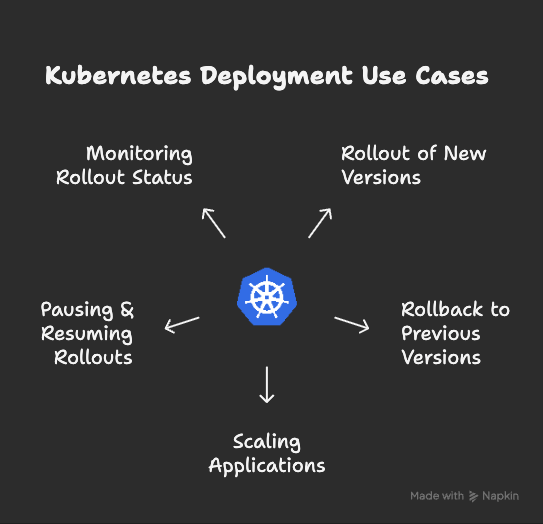
Kubernetes Deployments provide several practical benefits for developers and operators. Here are the most common use cases:
- Rollout of New Versions – Easily update applications with controlled rollouts by changing the Pod template.
- Rollback to Previous Versions – If something goes wrong, you can revert to an earlier revision.
- Scaling Applications – Scale Pods up or down based on traffic demands.
- Pausing & Resuming Rollouts – Useful when applying multiple updates at once before resuming the rollout.
- Monitoring Rollout Status – Detect stuck or failing rollouts in real time.
These features make Deployments indispensable for continuous delivery (CD) and zero-downtime deployments in Kubernetes.
Anatomy of a Deployment
A Deployment is defined in YAML or JSON format with several important fields:
| Field | Purpose |
|---|---|
metadata.name | The name of the Deployment |
.spec.replicas | Number of Pod replicas you want running |
.spec.selector | Identifies which Pods belong to this Deployment/ReplicaSet |
.spec.template | The Pod template (labels, containers, images, ports, etc.) |
This structure ensures that your application is reproducible, scalable, and manageable.
Update & Rollout Behavior
One of the most powerful features of Deployments is controlled rollouts. When you update the Pod template (e.g., a new container image), Kubernetes creates a new ReplicaSet.
- The new ReplicaSet gradually scales up.
- The old ReplicaSet scales down simultaneously.
- This rolling update ensures minimal downtime.
- Parameters like
maxUnavailableandmaxSurgeallow you to fine-tune the process.
Additionally, you can pause a rollout, apply multiple changes, and then resume safely.
Revision History & Rollback
Deployments automatically track revision history whenever .spec.template changes. This enables:
- Easy Rollbacks – Revert to an older revision if the latest rollout fails.
- History Tracking – Use
kubectl rollout historyto view past revisions. - Safe Updates – Rollbacks are declarative, ensuring consistency.
This functionality makes Deployments a critical tool for managing production workloads with confidence.
Important Constraints & Behavior
While Deployments are powerful, they come with constraints:
.spec.selectoris immutable once a Deployment is created.- Pod labels must always match the selector; otherwise, the Deployment is invalid.
- Kubernetes automatically adds a
pod-template-hashlabel to distinguish ReplicaSets of the same Deployment.
These constraints ensure that Deployments work predictably and without conflicts.
Frequently Asked Questions (FAQs) About Deployment
A Deployment is a controller that manages Pods and ReplicaSets, enabling declarative updates, scaling, and rollbacks for stateless workloads.
A ReplicaSet ensures a certain number of Pods are running, while a Deployment manages ReplicaSets and provides rollout, rollback, and scaling features.
Deployments are primarily designed for stateless workloads. For stateful apps, Kubernetes provides StatefulSets.
Kubernetes creates a new ReplicaSet, gradually scales it up, and scales down the old one — ensuring minimal downtime.
You can use kubectl rollout undo deployment <deployment-name> to revert to a previous revision.
No, the .spec.selector field is immutable in most Kubernetes versions.
[Video] What is a Deployment in Kubernetes?
Conclusion
A Deployment in Kubernetes is a robust and flexible way to manage application workloads. By letting you declare the desired state of Pods and ReplicaSets, it simplifies scaling, updates, and rollbacks. Its rollout mechanisms minimize downtime, while revision history ensures quick recovery from failures.
For anyone running containerized applications, Deployments are the backbone of reliable, scalable, and resilient workloads in Kubernetes.
[…] in most real-world scenarios, you should use a Deployment instead of a standalone ReplicaSet. A Deployment not only manages ReplicaSets but also handles updates and rollbacks […]