In the world of data storage, ensuring reliability and performance is critical. One technology that helps with this is RAID storage. RAID stands for Redundant Array of Independent Disks, and it allows data to be spread across multiple drives.
By doing this, RAID not only improves performance but also provides fault tolerance—so if one drive fails, your data can still be recovered. In this article, we’ll explore what RAID is, its benefits, downsides, types, and different RAID levels.
Table of Contents
What is RAID?
RAID is a method of storing data across multiple drives instead of relying on a single disk. It splits and distributes data in a way that can improve speed, capacity, and redundancy.
If one drive fails, RAID can help recover the data from other drives. Depending on the RAID level, it can also improve read/write performance.
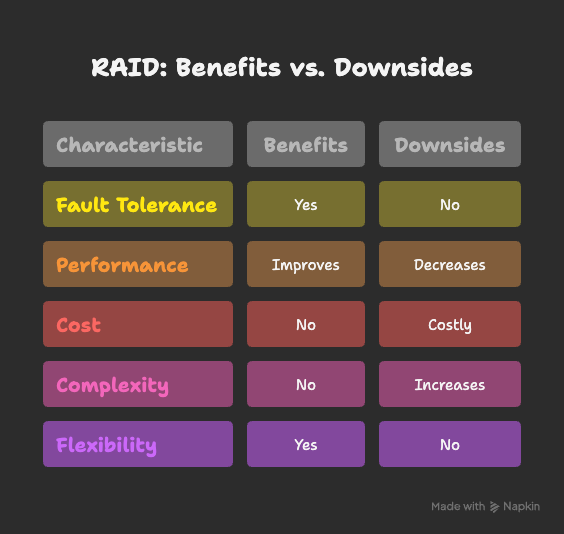
Benefits of RAID
- Provides fault tolerance against drive failures
- Improves read/write performance
- Supports different RAID levels based on specific needs
- Offers flexible setups for home users and enterprises
Downsides of RAID
- Can be costly depending on the setup
- Complexity increases with advanced RAID levels
- Performance can decrease in some parity-based RAID levels
Types of RAID
Software RAID
- Managed by the operating system using system resources.
- Cost-effective and supported by most OS platforms.
- Ideal for small businesses or personal use.
Hardware RAID
- Uses a dedicated RAID controller card to manage RAID independently from the CPU.
- More efficient and reliable, often used in enterprises.
- Provides better performance than software RAID.
Levels of RAID
RAID 0 (Striping)
- Splits data across drives for high performance.
- Minimum drives: 2
- ✅ Advantage: Fast read/write speeds
- ❌ Downside: No redundancy—if one drive fails, all data is lost
RAID 1 (Mirroring)
- Duplicates data on two drives for redundancy.
- Minimum drives: 2
- ✅ Advantage: Fault tolerance and simple recovery
- ❌ Downside: Storage capacity is cut in half
RAID 3 (Striping with Dedicated Parity)
- Uses one drive for parity and the others for data.
- Minimum drives: 3
- ✅ Advantage: High speed for sequential data
- ❌ Downside: If the parity drive fails, the system fails
RAID 5 (Striping with Distributed Parity)
- Distributes parity across all drives for fault tolerance.
- Minimum drives: 5
- ✅ Advantage: Handles single drive failure, good storage efficiency
- ❌ Downside: Slower performance due to parity calculations
RAID 6 (Double Parity)
- Similar to RAID 5 but stores two sets of parity.
- Minimum drives: 4
- ✅ Advantage: Can handle two drive failures
- ❌ Downside: More performance overhead
RAID 10 (Combination of RAID 1 + RAID 0)
- Combines mirroring and striping for the best of both worlds.
- Minimum drives: 4
- ✅ Advantage: High performance with fault tolerance
- ❌ Downside: Reduced usable capacity
FAQs About RAID Storage
RAID stands for Redundant Array of Independent Disks.
RAID 0 and RAID 10 provide the best performance, but RAID 0 has no redundancy.
RAID 1, RAID 5, RAID 6, and RAID 10 offer redundancy for data protection.
Yes, most operating systems support software RAID, and RAID controller cards can be used for hardware RAID.
No. RAID improves availability and redundancy but should not replace proper data backups.
Conclusion
RAID storage is a powerful solution for balancing performance, capacity, and data protection.
- If you need speed, RAID 0 or RAID 10 works well.
- If you need data redundancy, RAID 1, 5, or 6 are better choices.
- Enterprises often rely on RAID 10 for the best combination of performance and fault tolerance.
👉 In short, RAID makes storage systems faster and safer, but it should be used alongside a proper backup strategy for complete data protection.