When managing workloads in Kubernetes, maintaining fair resource distribution across teams and containers is essential. Without clear boundaries, one application can easily consume excessive CPU or memory, starving others in the same cluster.
That’s where ResourceQuota and LimitRange come in. Together, they form the backbone of Kubernetes’ resource management system—ensuring that no namespace or container exceeds its fair share of the cluster’s capacity.
In this post, we’ll break down both concepts, show you how they work, and help you decide when to use each one.
Table of Contents
What Is a ResourceQuota in Kubernetes?
A ResourceQuota is like a budget for an entire Kubernetes namespace. It defines the maximum total resources—such as CPU, memory, storage, and number of pods—that can be consumed within that namespace.
This ensures one namespace can’t monopolize cluster resources, keeping things balanced and predictable.
Example: ResourceQuota in Action
apiVersion: v1
kind: ResourceQuota
metadata:
  name: demo-quota
  namespace: demo
spec:
  hard:
    requests.cpu: "2"
    requests.memory: 2Gi
    limits.cpu: "4"
    limits.memory: 4Gi
    pods: "10"
In this configuration:
- The total CPU requests in the namespace cannot exceed 2 cores.
- The total memory requests cannot exceed 2GiB.
- The aggregate CPU limit is 4 cores, and the memory limit is 4GiB.
- Only 10 pods can exist in the
demonamespace at any time.
If a user attempts to create an 11th pod or exceed the allocated memory, Kubernetes will block the operation—keeping the namespace within its defined resource budget.
Why ResourceQuota Matters
- Prevents resource hogging by one team or project.
- Ensures fair usage across multiple namespaces in shared clusters.
- Supports multi-tenant environments where resource isolation is critical.
- Enables predictable scaling and billing in enterprise Kubernetes setups.
What Is a LimitRange in Kubernetes?
If a ResourceQuota is the total budget for a team, a LimitRange is like a spending limit for each employee.
A LimitRange defines default, minimum, and maximum CPU and memory values per container or pod in a namespace. It ensures that every container operates within healthy limits, even when developers forget to specify resource requests.
Example: LimitRange Configuration
apiVersion: v1
kind: LimitRange
metadata:
  name: demo-limitrange
  namespace: demo
spec:
  limits:
  - default:
      cpu: 500m
      memory: 512Mi
    defaultRequest:
      cpu: 200m
      memory: 256Mi
    max:
      cpu: "1"
      memory: 1Gi
    min:
      cpu: 100m
      memory: 128Mi
    type: Container
Here’s what this setup enforces:
- Default CPU limit: 0.5 cores (
500m) - Default memory limit: 512 MB
- Default CPU request: 0.2 cores (
200m) - Default memory request: 256 MB
- Maximum CPU per container: 1 core
- Minimum CPU per container: 0.1 core
If a developer forgets to declare CPU or memory requirements, Kubernetes applies these defaults automatically—preventing unpredictable performance or unintentional overuse.
ResourceQuota vs. LimitRange: What’s the Difference?
Both objects control Kubernetes resources but at different levels of granularity.
| Feature | ResourceQuota | LimitRange |
|---|---|---|
| Scope | Namespace-wide | Per pod or container |
| Purpose | Sets total resource caps for the entire namespace | Defines min, max, and default limits per container |
| Use Case | Multi-team or multi-project clusters | Individual container governance |
| Analogy | 🏦 Team budget | 💳 Employee spending limit |
Together, they ensure both the namespace and the containers inside it stay within healthy, predictable limits.
How ResourceQuota and LimitRange Work Together
Let’s say your DevOps team manages a demo namespace. You set a ResourceQuota to restrict total CPU and memory for the namespace. Then, you define a LimitRange to control how much each container can request.
- The ResourceQuota ensures the namespace doesn’t exceed its overall budget.
- The LimitRange ensures no single container overconsumes resources or starves others.
This dual-layer approach creates a balanced and efficient environment where every application gets its fair share of cluster capacity.
Best Practices for Using ResourceQuota and LimitRange
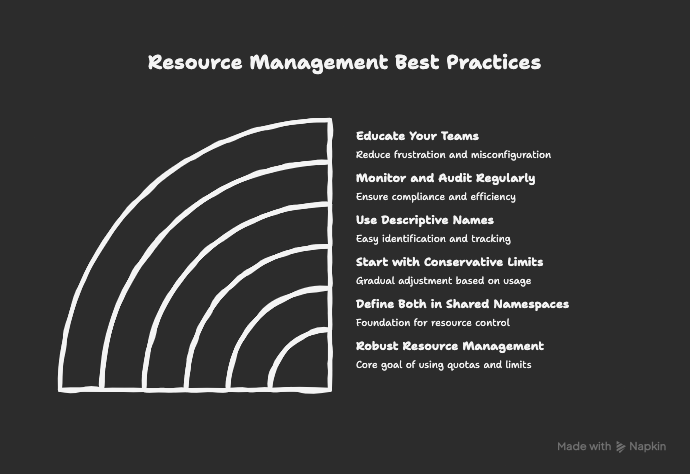
- Define Both in Every Shared Namespace
Combine ResourceQuota and LimitRange for robust resource management. - Start with Conservative Limits
Avoid overly tight constraints initially. Monitor usage, then adjust quotas and limits over time. - Use Descriptive Names
Use clear names liketeam-a-quotaorfrontend-limitrangefor easy tracking. - Monitor and Audit Regularly
Use tools likekubectl describe quotaorkubectl describe limitrangeto audit resource usage. - Educate Your Teams
Ensure developers understand how these policies affect their deployments. Clear documentation reduces frustration and misconfiguration.
FAQs About Kubernetes ResourceQuota and LimitRange
Kubernetes rejects the request. You’ll receive an error message indicating which resource quota was exceeded.
Not always—but using both provides better governance. ResourceQuota controls total usage; LimitRange enforces per-container discipline.
Use this command:
kubectl get resourcequota -n namespace-name
Yes. ResourceQuota supports separate limits for each resource type, giving you precise control over usage.
[Video] Explained ResourceQuota and LimitRange on Kubernetes
Final Thoughts
Kubernetes ResourceQuota and LimitRange are essential tools for maintaining balance, fairness, and reliability in shared clusters.
While ResourceQuota governs the total “budget” of a namespace, LimitRange ensures each container plays by the rules. Together, they prevent runaway workloads, optimize cluster performance, and keep multi-team environments running smoothly.
For more in-depth guidance, visit the below docs: