When deploying a Virtual Machine (VM) using an Open Virtualization Format (OVF) in vCenter, you may sometimes encounter an unexpected error—especially during a vCenter SR (Support Request). This issue can prevent successful VM deployment and often points to replication inconsistencies between vCenter instances.
Let’s break down how to identify and resolve this problem efficiently.
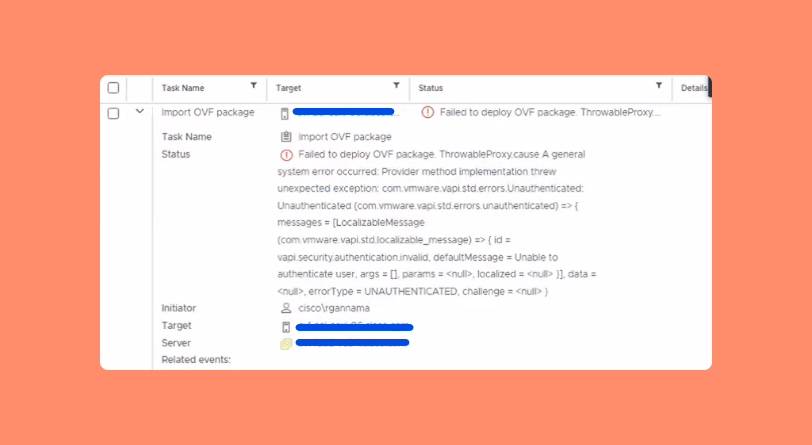
Table of Contents
Common Causes of the vCenter OVF Deployment Error
The vCenter OVF Deployment Error usually occurs when replication between multiple vCenter Server (VC) instances isn’t properly synchronized. If your environment contains multiple VC instances, inconsistent replication data can block certain deployment operations.
Typical causes include:
- Replication delays between VC partners
- Unresolved replication conflicts
- Network connectivity issues between vCenter nodes
Step-by-Step Fix for the vCenter OVF Deployment Error
Follow these troubleshooting steps carefully to resolve the issue.
Step 1: Identify the Number of vCenter Instances
First, determine how many vCenter instances are running in your environment. In many enterprise setups, there might be multiple instances (for example, four or more).
This helps you understand which nodes could be experiencing replication issues.
Step 2: Check Replication Status
Run the following command on your vCenter Server to verify the replication status between the VC instances:
/usr/lib/vmware-vmdir/bin/vdcrepadmin -f showpartnerstatus -h localhost -u administratorThis command displays the replication relationship between the vCenter nodes and shows whether replication changes are pending.
Step 3: Analyze Replication Changes
If you notice that the partner change value is greater than 0, it means replication hasn’t been successfully synchronized yet. You’ll need to resolve this replication issue before proceeding.
Once replication is fixed, try deploying the OVF again—it should work without any errors.
Why Fixing Replication Matters
Proper replication ensures all vCenter Server instances share consistent data about configurations, permissions, and objects. Without it, deployment tasks like OVF imports may fail or behave unpredictably.
Pro Tip: Prevent Future Deployment Errors
To minimize future issues:
- Schedule periodic replication health checks.
- Ensure network latency between vCenters stays minimal.
- Keep all vCenter instances updated to the same version.
These proactive steps help maintain stable performance and reduce support incidents.
Frequently Asked Questions (FAQs)
It typically happens when there’s a replication issue between multiple vCenter instances or network interruptions during deployment.
Run the command:/usr/lib/vmware-vmdir/bin/vdcrepadmin -f showpartnerstatus -h localhost -u administrator
You must fix the replication issue before retrying the OVF deployment. Once replication is synchronized, the error should disappear.
Yes. Ensure all vCenter instances are running the same version to prevent replication or compatibility issues.
It’s best to check replication health at least once a month or before any major deployment or upgrade.
Conclusion
The vCenter OVF Deployment Error can be frustrating, but it’s usually caused by replication inconsistencies between vCenter instances. By checking and repairing replication using the steps above, you can quickly restore normal deployment functionality.
If you’re still facing issues, consider reaching out on VMware’s official documentation or community forums for expert help.