With the release of vSphere 5, VMware introduced a new concept called VIB, which stands for vSphere Installation Bundle. In simple terms, a VMware VIB is the core building block of an ESXi host image.
If you want to add, update, or remove specific functionalities or drivers in an ESXi image, you’ll do it using VIBs. This guide explains what a VIB is, its components and types, and how to manage VIBs using commands in VMware ESXi.
Table of Contents
What Is a VMware VIB?
A VMware VIB (vSphere Installation Bundle) is a software package that contains drivers, extensions, or updates for an ESXi host.
You can think of it as a ZIP or TAR archive containing all necessary files to extend or modify ESXi functionality. For example, if you install ESXi on new hardware, you may need to add certain VIBs to ensure compatibility and proper performance.
In essence, VIBs are similar to device drivers — they help your ESXi host communicate effectively with underlying hardware or enable additional features.
Main Components of a VMware VIB
Every VIB package consists of three main components, each serving a specific role:
File Archive
This contains the actual payload — such as drivers, scripts, or binaries — that provide the functionality.
XML Descriptor File
This file includes metadata and information about the VIB, such as dependencies, version numbers, and whether a reboot is required after installation.
Signature File
The signature verifies the authenticity and trust level of the VIB. It indicates whether the file is officially supported by VMware, its partners, or community developers.
Types of VMware VIBs
VIBs are categorized based on their signature and support level. There are four main types of VIBs:
VMwareCertified
- Developed and tested directly by VMware.
- Fully supported and validated.
VMwareAccepted
- Created and tested by partners, with results reviewed by VMware.
- Considered reliable and widely used in production environments.
PartnerSupported
- Developed and tested exclusively by VMware partners.
- VMware does not validate or support these VIBs directly.
CommunitySupported
Not supported by VMware or its partners and should be used cautiously.
Created by individual developers or the open-source community.
Why You Might Need to Remove a VMware VIB
Sometimes, you may need to remove a VMware VIB from an ESXi host. Here are common scenarios:
- The hardware device associated with the VIB is no longer in use.
- The functionality provided by the VIB is no longer required.
- The new ESXi image already includes the functionality, making the extra VIB redundant.
Removing unnecessary VIBs helps maintain a clean and efficient ESXi environment.
Important VMware VIB Commands
VMware provides simple esxcli commands to manage VIBs — including listing, installing, updating, or removing them.
Here are the most commonly used commands:
| Action | Command |
|---|---|
| List all installed VIBs | esxcli software vib list |
| Remove a VIB | esxcli software vib remove -n <vib-name> |
| Update a VIB from ZIP file | esxcli software vib update -d <path-to-zip> |
| Update a VIB from ISO | esxcli software vib update -v <path-to-iso> |
| Install a VIB from ZIP file | esxcli software vib install -d <path-to-zip> |
| Install a VIB from ISO | esxcli software vib install -v <path-to-iso> |
💡 Tip: Always verify the source and compatibility of a VIB before installing it on a production server.
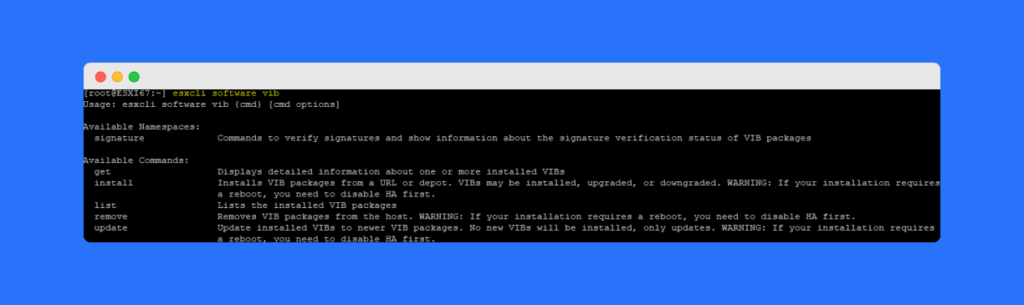
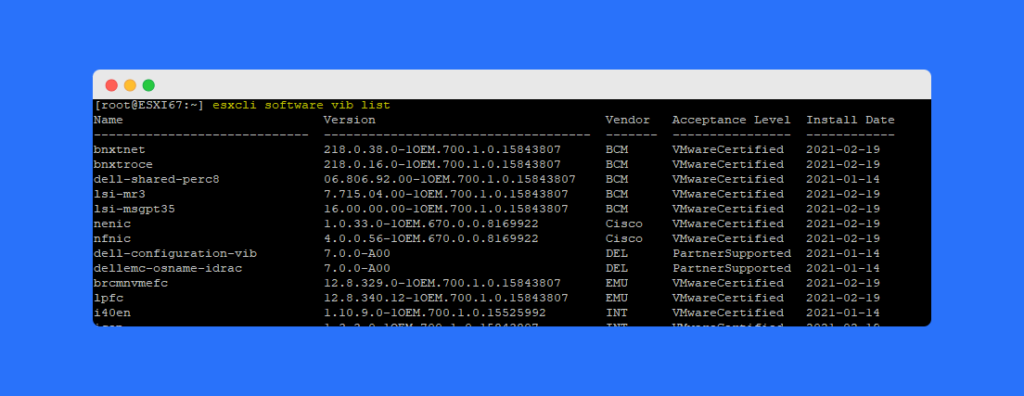
How to Check and Remove VIBs in ESXi
If you’re troubleshooting or cleaning up your ESXi host:
- Run
esxcli software vib listto see all installed VIBs. - Identify the VIB you want to remove.
- Use the command:
esxcli software vib remove -n <vib-name> - Reboot the host if required.
This process ensures that outdated or unused VIBs are safely removed without affecting other components.
Frequently Asked Questions (FAQs)
A VMware VIB (vSphere Installation Bundle) is a software package that adds or updates drivers and functionality in ESXi.
You can install a VIB using the command:esxcli software vib install -d <path-to-zip> or -v <path-to-iso>.
Yes, it’s safe as long as the VIB isn’t required for your hardware or system operations. Always confirm before removing it.
There are four types: VMwareCertified, VMwareAccepted, PartnerSupported, and CommunitySupported.
VMware uses VIBs to simplify ESXi customization, allowing easy addition or removal of specific drivers and features.
Conclusion
The VMware VIB is an essential part of the ESXi architecture. It allows administrators to extend, customize, or update their VMware environment efficiently.
By understanding the components, types, and management commands, you can handle VIBs confidently — whether installing new features or removing outdated ones.