HDD vs SSD vs SAS vs SATA: Choosing the Right Drive for Your Needs
In the IT world, we deal with huge amounts of data every day. To manage and store that data effectively, different types of drives are used. Not all drives are designed for the same purpose—some are better for capacity, while others are built for speed or high performance.
In this article, we’ll break down the main types of computer drives based on their architecture and connector type.
Table of Contents
Based on Drive Architecture
1. HDD (Hard Disk Drive)
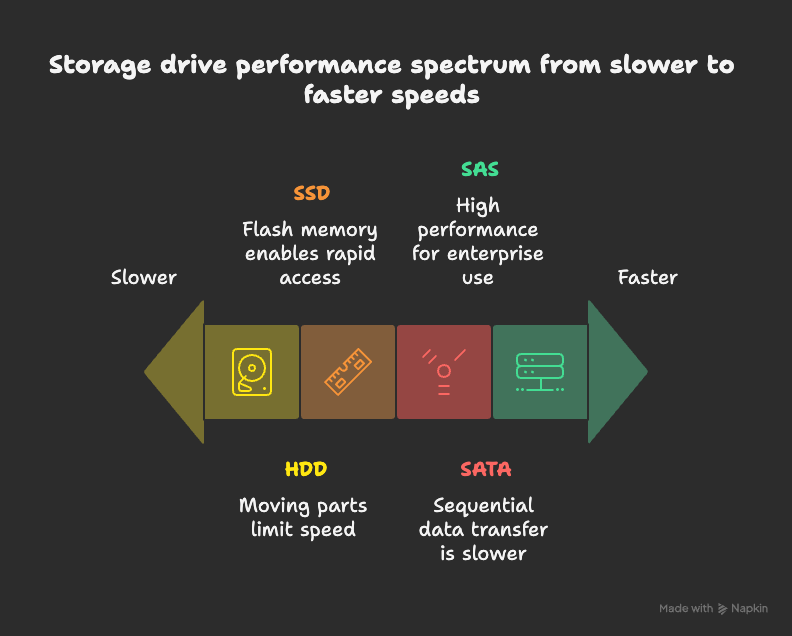
HDDs are the most common type of storage drive. They use moving mechanical parts to read and write data.
- Performance: Moderate, slower than SSDs.
- Capacity: Large storage sizes available.
- Varieties: Speeds range from 7.2K RPM to 15K RPM.
- Best for: Everyday computing and when large storage is needed at a lower cost.
2. SSD (Solid State Drive)
SSDs have no moving parts. Instead, they use flash memory chips, making them much faster than HDDs.
- Performance: High read/write speeds.
- Durability: More reliable since they lack moving parts.
- Cost: More expensive per GB than HDDs.
- Best for: High performance, faster boot times, and improved overall system speed.
Based on Connector Type
1. SATA (Serial ATA)
SATA is a widely used connector that transfers data sequentially from the motherboard to the drive.
- Performance: Slower compared to SAS.
- Use case: Normal computing, laptops, desktops.
- Benefit: Affordable and good for general storage.
2. SAS (Serial Attached SCSI)
SAS connectors are designed for high performance and reliability. They’re typically used in enterprise environments.
- Performance: Much faster than SATA.
- Use case: Servers, data centers, and high-availability systems.
- Benefit: Supports higher workloads and is built for 24/7 operations.
Conclusion
When it comes to storing and managing data, the right drive depends on your needs:
- Choose HDDs if you want large, affordable storage.
- Pick SSDs if speed and performance are your priority.
- Go with SATA for cost-effective, everyday computing.
- Use SAS for enterprise-grade, high-performance workloads.
By understanding the different types of computer drives, you can make smarter choices that balance cost, performance, and capacity.